
Data recovery from Samsung smartphones is a technically complex process that depends on the device model, motherboard condition, storage technology, Android version, and security mechanisms implemented in the device.
If a Samsung phone has suffered physical damage, liquid exposure, stopped powering on, is stuck on the Samsung logo, is experiencing a boot loop, or has a motherboard failure, data recovery may be possible depending on the condition of the device.
The primary objective of
Data Recovery Service is not necessarily to restore the phone to full working condition, but to restore access to the stored data and safely transfer it to another storage device.
When Is Samsung Data Recovery Required?
Data recovery may be required when:
- the phone does not power on;
- the device is stuck on the Samsung logo;
- the phone is stuck in a boot loop;
- the device has suffered physical impact;
- the phone has been exposed to water or other liquids;
- the motherboard has a short circuit;
- there is a power-management failure;
- the USB connector or charging circuit is damaged;
- the computer does not detect the device;
- corrosion is present on the motherboard;
- previous repair attempts have damaged components or PCB traces;
- software or system problems prevent access to user data.
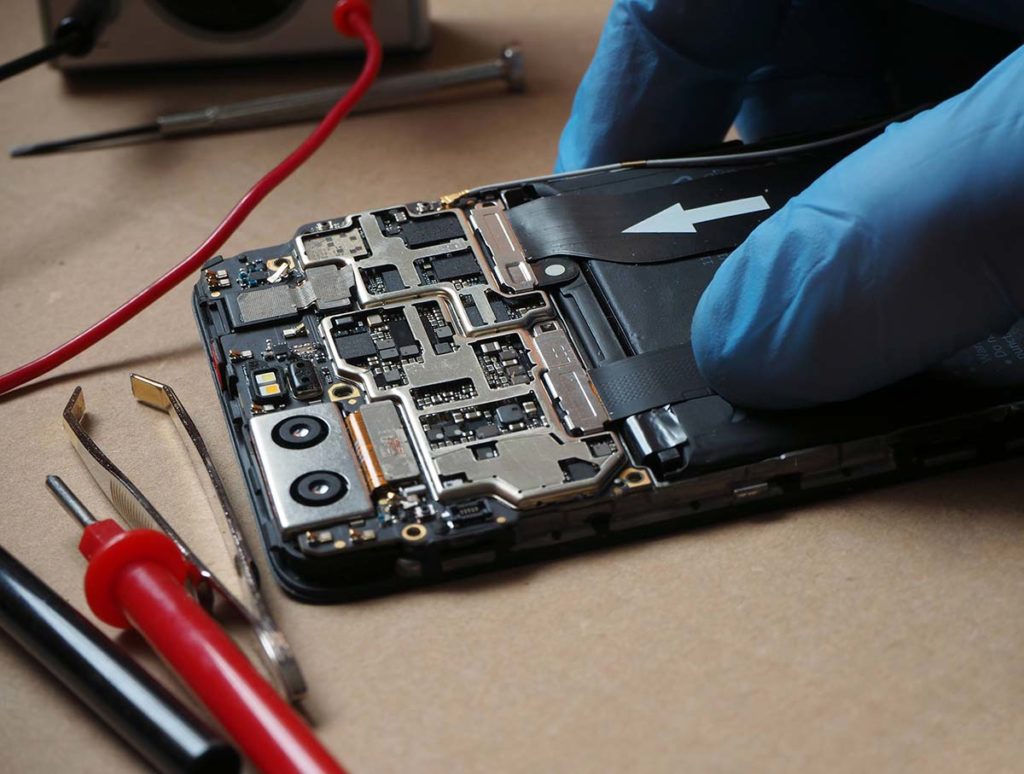
Data Recovery Is Not the Same as Phone Repair
Full phone repair means restoring the device and its functions to normal operation.
With data recovery, the primary objective is to obtain access to the stored information and transfer it to another storage device.
For example, the display, camera, biometric functions, or other components may remain defective if their restoration is not necessary for accessing the data.
Motherboard Diagnostics
After the device arrives at the laboratory, a detailed diagnostic process is performed.
The technician checks:
- the motherboard under a microscope;
- signs of liquid damage and corrosion;
- possible short circuits;
- primary power rails;
- Power IC and power-management circuits;
- USB and charging circuits;
- whether the device is detected by a computer;
- evidence of previous repair attempts;
- CPU/SoC condition;
- eMMC or UFS storage condition.
Depending on the failure, laboratory power supplies, multimeters, oscilloscopes, thermal diagnostics, and other specialized equipment may be used.
eMMC and UFS Storage
Different generations of Samsung smartphones use different storage technologies, including eMMC and UFS.
Older devices commonly use eMMC, while modern Galaxy smartphones predominantly use UFS storage.
A physically healthy memory chip does not automatically mean that its user data can simply be read.
Modern Android devices use encryption and hardware/software security mechanisms. Therefore, simply removing an eMMC or UFS chip and connecting it to another device is often insufficient to access the user's data.
CPU, UFS and Encryption
In modern Samsung devices, the relationship between the CPU/SoC, storage and device security architecture is extremely important.
Therefore, when the motherboard is damaged, the objective is often not to read the memory chip separately, but to restore the original device environment sufficiently to obtain access to the encrypted data.
This is particularly important on modern UFS-based Samsung smartphones.
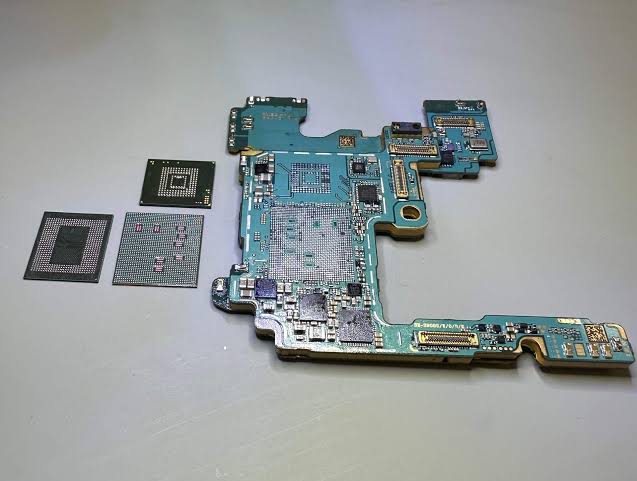
If the Phone Has Been Dropped
A strong impact can cause:
- damaged BGA connections;
- broken PCB traces;
- loss of component connections;
- damage to power circuits;
- microscopic cracks in the board or components.
Even when the phone appears normal externally, serious internal motherboard damage may be present.
Liquid Damage
If a Samsung device has been exposed to water or another liquid, do not attempt to power it on or connect it to a charger.
Corrosion and short circuits can continue after the initial liquid exposure. Repeated attempts to power on the device may cause additional component damage.
If the data is important, stop using the device and have it professionally diagnosed as soon as possible.
Previous Repair Attempts
Previous repair attempts can significantly complicate data recovery.
For example:
- PCB pads may have been damaged;
- traces may have been broken;
- BGA soldering may have been performed incorrectly;
- the UFS/eMMC area may have been damaged;
- incorrect components may have been installed;
- an additional short circuit may have been introduced.
For this reason, it is important to inform the technician about any previous repair attempts.
Deleted Data
Recovering data from a damaged phone and recovering previously deleted files are two different processes.
If the phone is not functioning, the primary objective is to regain access to the existing data.
If the user has already deleted the data or performed a Factory Reset, the outcome depends on the device model, Android version, storage technology, encryption system, and other factors.
Therefore, recovery of deleted data cannot be guaranteed in advance.
If the Display Is Damaged
If the motherboard is functional but the display is broken, a complete phone repair may not always be necessary.
Depending on the situation, data may be recovered and transferred to:
- an external SSD;
- an HDD;
- a USB storage device;
- another storage device supplied by the customer.
For large amounts of data, an external SSD is recommended.
PIN and Password
The screen PIN or password is an important part of the device's security system.
Physical access to the device's storage does not automatically provide access to encrypted user data.
The customer must provide the correct PIN or password for their device.
DataRecovery.az does not provide password cracking, security bypass, or unauthorized access services.
Confidentiality
Customer data, including photos, videos, documents, contacts, and other files, is treated as confidential information.
All recovery work is performed according to strict confidentiality principles.
Recovery Time
The recovery time depends on the type and severity of the damage.
Simple electronic failures may be resolved relatively quickly. Liquid damage, severe PCB damage, previous unsuccessful repairs, and UFS-related problems may require significantly more time.
An accurate timeframe can only be determined after the device has been diagnosed.
Recovery Success
It is not technically possible to guarantee successful recovery in every case.
The result depends on:
- motherboard condition;
- CPU/SoC condition;
- UFS/eMMC condition;
- power-management system;
- level of corrosion;
- previous repair attempts;
- device model;
- Android version;
- encryption and security state;
- availability of the correct PIN/password.
The actual recovery potential can therefore only be evaluated after professional diagnostics.
Important
If your Samsung phone does not turn on, has suffered liquid damage, has been dropped, is stuck on the Samsung logo, or is not detected by a computer, do not repeatedly attempt to power it on or charge it.
Especially after liquid exposure, applying power can cause additional motherboard damage.
Data Recovery Service — professional data recovery for Samsung and other Android devices.
Our objective is not necessarily to fully repair the phone, but to obtain access to the data and recover as much information as technically possible.